| Tool Mentor: Entering OpenUP Requirements in ALM |
 |
 |
|
| Related Elements |
|---|
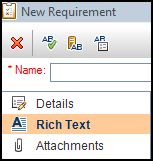
Upon the creation of a new Requirement in ALM, follow these procedures to create a new RTF Document for the specified Requirement: 1. Click the Rich Text tab on the left side of the New Requirement window.
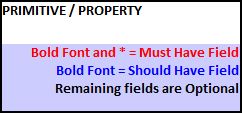
2. Fill in the appropriate information under the Details column for each field. a. Follow the Primitive/Property column’s color coordinated guidelines for specific field requirements.
3. Once all desired content has been entered for the ENTIRE REQUIREMENT, click on the submit button at the bottom of the New Requirement window.
a. DO NOT click submit if all desired content has not been entered in either the RTF or Details tab of the new Requirement. *NOTE* If submit is clicked, the content can be accessed and edited by double clicking on the name of the Requirement that was just created.
|